Showing posts with label apple. Show all posts

Thursday, September 06, 2007

iPod Tall, the iPod Grande, and the iPod Venti

I don’t know why Apple just doesn’t grab me by my ankles and shake my money out of my pocket. They really make it hard for me to resist picking up their new toys. A revived and renewed line of iPods was annouced yesterday, and there are some nice surprises:


iPod nanos have been redesigned and now plays video. This comes as a surprise as I thought Apple would stick with the more gym-friendly/pack of gum shaped player. The new players appear to be the size of an iPod cut in half, with a 2-inch screen that Apple claims has the same high quality resolution as the full-sized video iPod. They come in a 4GB ($169 CDN) and an 8GB ($219 CDN) version, with battery life estimated at 24 hours audio, 5 hours video playback. These will be in the stores this weekend.

The video iPod is slightly touched up with a new name (iPod Classic), a new metal shell, and a hell of an upgrade on the storage size: an 80GB model ($279) and a 160GB ($399) model. Holy crap, it comes in “Jason Size”. Nice to see that I can back-up all my music on the iPod and still have room for TV shows and movies. The new iPod Classics are on the shelves this weekend.

The winner though is the new iPod Touch model. Basically it’s the iPhone without the phone service, but you still get Wireless Internet! You get a touch screen iPod with a web browser, and now you can finally buy music wirelessly direct from the new WiFi iTunes store. Add in the direct link to YouTube videos and that’s good geeking right there. I wasn’t waiting for an iPhone, but I’d love to use an iPod Touch. The memory appears to be flash like the nano, so the capacity is smaller than a standard iPod. The 8Gb model runs $329 CDN and the 16GB model runs $449. This model won’t be in stores until the end of the September. It will sell well this holiday, but I hope to see a 80+ GB model soon. Now that would sell.


No changes to the iPod Shuffle aside from some new colours. It runs you $89 CDN with 1GB storage.

No announcements on the iPhone coming to Canada yet, but the price in the US dropped. The iPhone is now only available in an 8Gb model, but the price dropped down to $399 US.

Another interesting initiative: Apple and Starbucks are in partnership to sell music wirelessly in Starbucks outlets. You go into Starbucks, you hear the song playing, you break out the iPod Touch and go to the WiFi store, and it shows you what songs are playing right there in the Starbucks. A couple taps and you can buy the song right there on the iPod Touch. Holy corporate synergy. It’s not exactly a feature that fans were clamouring for, but it’s an intriguing idea. Apparently iPods and coffee go together. No idea if this is US only or when it will rollout in Canada.

Apple’s lineup for this holiday season: the iPod shuffle in 5 great new colors; the iPod nano with video; the renewed iPod classic with up to 40k songs/160GB in your pocket; and the hot item this season, the iPod Touch with WiFi. Consumers, start your spending.

Full coverage of the Apple presentation by Steve Jobs

Apple Store Canada

Tuesday, June 05, 2007

Apple announces iPhone sell date


Apple has confirmed a U.S. on-sale date of June 29th for the new iPhones. It appears Apple has made this product their number one priority, even going so far as to delay the debut of their new Leopard O/S as the reallocated resources to the iPhone. The iPhone is the next big risk for the company that has been floating on the success of the iPod music players and renewed interest in Apple designed products, as this is their first foray into the cellular phone market.

The iPhone is a melding of cell phone and iPod, allowing you to watch videos in widescreen. Apple's website shows off the the phone's large touchscreen, and highlights it's ability to watch video, play music and display photos. Most of the design elements, like the touchscreen, are things we will likely see incorporated into the next generation of iPods. New ads can also be seen on the company's Web site.

The phone will retail for about $500 - 600 U.S. depending on how much memory is included, either 4GB or 8 GB. The memory size is comparable to the iPod Nanos, which use flash-based memory, as opposed to the heavier, bulkier iPods that use a hard drive.

No official announcement on Canadian distribution has been made yet, but speculation is that Rogers Wireless is the most likely carrier. AT&T is the exclusive wireless provider in the U.S.

Apple iPhone website

Globe & Mail: Apple set to launch iPhone

Tuesday, January 09, 2007

Apple unveils iPhone; sucks to be Zune


After months of speculation, Apple finally unveilled the long in development iPhone, which blends the multi-media functionality of an iPod, with wireless internet and phone. I think I just heard Motorola and Nokia passing out.

Apple already has the iPhone up on their site. No word on price or Canadian carriers, but it appears Cingular Wireless will carry the GSM phone in the US. My money is on Rogers as the initial Canadian carrier.
Update: The phones will start shipping in June. A four-gigabyte model will cost US$499, while an eight-gigabyte IPhone will be $599. Prices will be probably be lower for those buyers who sign up for cellular plans.
  • The beauty part of this device is that it's a touchscreen interface, and switches to a widescreen video mode. Bye-bye click wheel on the next round of iPods?

  • The memory comes in either 4GB or 8GB, which puts it in the iPod Nano range. There appears to be an expandable memory slot on it too.

  • Runs on OS/X platform, and you can sync it with iTunes on your PC or Mac.

  • Safari internet browser, and syncs to your bookmarks on your PC or Mac.

  • 2.0 MP camera

  • Very very shiny

  • It says 5 hour battery life in video playback or talk mode. Probably eats battery power like a monster.
On sale date hasn't been announced yet, likely pending Federal Communication approval. But damned if it doesn't look like the wait was worthwhile.

BoingBoing.net has on the spot coverage:
Width: 11.6mm. Runs OSX. Will be iPod + mobile phone + internet communicator. No bottom keyboard, but a screen that can shift. One button on front, 3.5" screen, 160 pixels per inch display. Jobs: "Multitasking, networking, power management, graphics, security, video, graphics, animation." Ambient light sensor. Accelerometer allows it to sense whether in portrait or landscape mode. View video, listen to music with iTunes... contact management, scroll through contacts... visual voicemail... Quad-band, WiFi, bluetooth, GSM / EDGE data.

Jobs: "What's the killer app? Making calls!," promises ease of use for initiating and receiving calls.... multi-session SMS messaging... widgets... push IMAP, like Blackberry... Safari web browser...

Sucks to be a Treo or Zune today.
Apple also announced their AppleTV module, which will allow users to stream digital media from their computer to their TV sets. It's priced on the site at $299 US.

Tuesday, January 02, 2007

Suiting Up your iPod

In response to the usual rush of "I just got an iPod for Christmas, not what do I do" questions I get this time of year, I direct you to my iPod post: the2scoops iPod toolkit. It's a primer on how to set up and get the most from your iPod.

My recommended manufacturer for the iPod is still Marware. I've had a few different cases and these are the best I've used so far. The iPod is snug in it's little body armour. When you have an ill-fitting iPod case, the iPod moves around a little, allowing dirt or debris to get caught between the case and your screen, causing scratches. I've used the Marware Sidewinder model for months and it's terrific. The protections is top notch, the features are practical (the kickstand and headphone holders are especially handy), and my iPod looks kind of badass in its armor. The benefit is the adapter plate inside, which means the Sidewinder can hold my 30 GB or convert to hold the thicker 60GB or 80GB models with a click of the adapter. I don't flinch if the iPod is fumbled or drops as long as it's suited up

The only drawback is that I have to take the iPod out of its armor when I want to plug it into a dock or device like my iHome alarm clock. I just have to remember to pop the suit back on it and not leave it unprotected on a desk. Having rambunctious pets or children will lead to a banged up MP3 player and heartache if you aren't careful.

Tuesday, July 11, 2006

the2scoops iPod toolkit

I've been getting emails lately from friends who have bought into the Cult of the Pod. It's easy to start up with an iPod, but you'd be surprised what you can do with iTunes and the iPod. These links are helpful for tips, extension programs, reviews and forums on all things iPod. If you need more help, give me a shout through the email or MSN link in my profile:

iLounge - this site is the be all and end all of iPod. Loads of reviews on iPods and accessories, I found it particularly handy in finding the best iPod case and headphones for my needs. The forums are helpful for all you questions and there are several excellent "How The Hell Do I..." iPod 101 tutorials available.

I was trying to clean up my collection of MP3 files when I came across this handy post Tidy Up iTunes MP3 Collection - Fix ID3 Tags And More. It lays out the steps to properly manage your database:

1. Tagging - MusicBrainz free program helps get your album info correct
2. Re-import or update iTune files (deselect the "Rename File" option in your MusicBrainz program or this will get complicated)
3. Remove Duplicates using iTunes
4. Import Album covers to the music files using iTunes Art Importer

The handy links:

The most useful MP3 tool out there. MusicBrainz is a free community based music database. You can use the Musicbrainz program and database to automatically identify and label your music files with all the correct artists and title info, and format everything consistently. Be sure to uncheck the "Rename File" option in the toolkit if you are scanning your active iTunes music files, otherwise iTunes won't be able to find the files based on the old filenames.

The other useful tool is iTunes Art Importer, which copies the album art off of Amazon to your iTunes files.

the2scoops tips:

1. First thing you do: register that Applecare agreement. The iPod is hardware and software. Like all computers, weird shit can happen to make it non-functional. Keep that warranty up to date. The two times something happened with my older model iPod, I was surprised how easy it was to go in to the local Apple Store, get it tested, and leave with a replacement quickly.

2. Leave the headphones in the box. I don't care if you think it's trendy to have those little white iPod brand headphones - they are cheap and offer a limited range of sound. Invest in a decent pair of headphones, even a $20-30 model, and you will be surprised at how rich the sound is out of that little gadget. I prefer over the ear headphones as ear-buds never fit right and irritates my hearing. Two of my favourites are the Koss Porta-Pro and the Sennheiser PX 100 Headphones: function over form.

3. Get a decent case to protect your investment - I have tried a few and the best I've had are the Marware brand cases. Tough, portable, and the newest iPod cases have a kickstand so you can stand up your iPod and watch videos.

4. When you put your music on the iPod, the easiest way is to set up a playlist called "Ipod Stuff" or "Ipod Library", drag and drop the music you want to take with you into the playlist, and sync the iPod up to that rather than sync your entire collection. Use several playlists for variety: I have use a variety of lists including Morning Wake-Up, City Walks, and Get My Energy Up for Work.

4. Learn what iTunes can do - take some time and learn how to keep your music neat, organized, and experiment with the Smartlist function. If you have a lot of music you can use Smartlist to put together playlists for you based on your ratings, how often it's played, the last time you heard or any combination of criteria. Handy for when you can't pick what to put on your iPod.

My ratings:

5 star - Never get tired of this song, desert island picks.
4 star - Great song I like to hear often.
3 star - Good song. Average.
2 star - I only keep this song because I want the complete album. I wouldn't miss it.
1 star - Reserved for bad songs to delete or broken mp3 that need to be fixed.

Handy previous posts:
the2scoops: The Post About Music Blogs
the2scoops: the2scoops Podcast list

Thursday, June 22, 2006

Dear Apple, Make Me an Offer

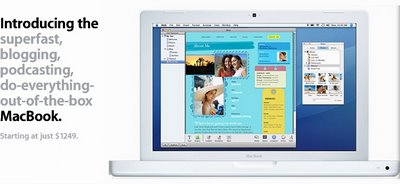
Had a long couple of days, I'll post my "first day of summer" (June 21st) post Thursday. They don't call it the lazy days of summer for nothing. No, seriously, too tired to copy the post from my notepad to the computer. See the little time indicator down there? This is why I need a MacBook, I could have done this live earlier from wherever I was.

Dear Apple, if you're reading this, if you can give me a pretty and useful MacBook, I will write so many nice complimentary things about it. It could be a marketing project, give a blogger a free MacBook and show how easy it is for a PC owner to switch to Mac. I could blog about it. I can be bought, I can be a corporate shill. Just imagine it:

the2scoops
brought to you by Apple Macbook

All right, look away, you shouldn't see me like this. You can't judge me. Who are to judge? You... you... Judgie McJudgerson!

If anyone finds my scruples laying around somewhere could you just preserve them in gin and give them a good home?

Monday, February 06, 2006

the2scoops Podcast list

Want to avoid making eye contact with the other zombies on the subway? Try a few podcasts to break up your playlists. Listen to enough of them and you'll be able to contribute to conversations and eventually form meaningful relationships.

Here are some great podcasts I'm listening to lately. Podcasts are essentially downloadable programs and essays that you to listen to on your computer or on your MP3 player. Once you subscribe (free) you receive daily or weekly updates automatically. I make a point of taking a few on the iPod to break up my constant stream of music.

To receive a podcast, you need version 4.9 of iTunes installed: http://www.apple.com/itunes. It is free to use and is my music software of choice, easiest to manipulate, more intuitive than other programs.

Podcasts

  • CBC Radio 3: Breaking New Sound - Sooo much good music to find here. It contains 100% Canadian music from new and emerging artists from a variety of genres. I've found some great new artists here and even though it may not be all to your taste, you'll find something new to love. One of the top podcasts worldwide. Bonus: most of these bands tour relentlessly. You can see 6 or 8 shows from these guys for the price of a Nickleback ticket.
    ITunes Podcast Link: CBC Radio 3

  • The British are funny. It's been proven. For some good laughs, Ricky Gervais (creator of TV's The Office) has been offering The Ricky Gervais Show for downloading:
    Karl Pilkington, unencumbered by any meaningful degree of intellect, continues to elicit exasperation and exultation in equal measure from Ricky Gervais and Steve Merchant.
    He is making a set of 12 (up to episode 9 right now) and is just a silly show. Episode 8 features readings from Karl's diary which were so ridiculous and spins on so many tangents I almost choked trying not to laugh right out loud on the bus.
    ITunes Podcast Link: The Ricky Gervais Show
    Website: Ricky Gervais
    Podcast Website: Guardian Unlimited - Ricky Gervais podcast

  • Slate's Daily Podcast offers a selection of stories, interviews, and weekly American political roundup from Slate online magazine.
    ITunes Podcast Link: Slate Daily Podcast

  • KCRW.com station in San Diego offers of some of the live sessions performed by unsigned and independent artists.
    ITunes Podcast Link: Mornings Become Eclectic

  • There are about 20 other programs avalable, spanning news, politics, arts and business. Check out the list: KCRW Podcasting

Thursday, January 26, 2006

iPod Radio finally available

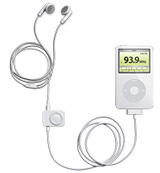
One of the two main complaints about iPods, in addition to the non-replaceable battery, is that it lacks an FM radio, something found on most MP3 players competing with Apple. Fresh on the market are two new products to solve that problem. Both Apple and Griffin Technlogy have put out combination FM Radio/Remote Control gadgets, both are well reviewed, and both are a bit steep at $60 Cdn.


The iFM from Griffin Technology is the best bang for your buck if you don't have a iPod Video or Nano model. It combines 3 helpful tools in one: an FM radio tuner, a remote control, and a voice recorder. The radio and remote work for the Mini, 4th Generation (the last black and white screens) and the Photo models. The recorder functions only with the older 4G (click wheel) and Photo models.

There is a separate model which is just the radio and wired remote. That one works for the iPod Video models and the Nano, as well as the Mini, the 4G and the Photo.


Apple has a radio/wired remote accessory too, with no recording functions. The remote is wired into the dock connector and the cute part is you tune the radio using the click wheel and the screen recreates an analog radio dial. As of this writing, the Apple model only works for the new Nano and Video models and Apple hasn't released any software to make it work with older iPods.

All these gadgets draw power from the iPod, have presets available for the stations, and got good reviews on the iLounge site. Read the reviews, as I haven't gotten a free one. I must need to increase my readership or something...

Bottom line is if you have an older iPod, go with the Griffin. Video and Nano owners can flip a coin. I'm not holding my breath waiting for a satellite radio add-on.

Review - Griffin iFM Radio and Remote for iPod, with and without Dock Connector
Review - Apple Computer iPod Radio Remote


The Apple version is $59.00 cdn:
The Apple Store (Canada) - iPod Radio Remote

The Griffin iFM is $59.99 cdn for either model:
Computer Systems Centre - iFM Radio, Remote, and Recorder for 4G iPod
Computer Systems Centre - iFM FM Radio and Wired Remote

Wednesday, August 17, 2005

This Is Not a Mac Solution - I-Book stampede

Schools' laptop sale in Richmond turns into a stampede

File under : Stupid Stupid Shoppers

A school board sells off some 4-year old I-Books for $50. Chaos ensues. My favourite indication that we should question the values taught by the Virginia school system:

I took my chair here and I threw it over my shoulder and I went, 'Bam,'" 20-year-old Jesse Sandler said nonchalantly, his eyes glued to the screen of his new iBook as he tapped away on the keyboard at a testing station. He admitted to using a folding chair he had brought with him to beat back people who tried to cut in front of him.


Mac News: Apple News : Laptop Sale Turns Into a Stampede

I wonder if that's how The Rock shops for groceries: "Back away from the papaya, or I shall lay a smackdown upon ya' gabroni! BAM!"

The Wonder of the Wild: ROM presents the Wildlife Photographer of the Year exhibition.

Curiosity and the Cat / © Hannes Lochner (South Africa) I’ve been visiting the  Royal Ontario Museum regularly, mainly through the Friday N...